
For the operator
You stop reconstructing the ticket. The proposal arrives with its evidence marked observed or inferred and its gaps named. Change the fields you disagree with, approve once, and the card tells you when the ticket reads Triaged.
AI ticket triage for SharePoint
For the tickets that stall because nobody can say which team owns them: Microsoft 365 Copilot proposes one route with its evidence, your operator approves once, and the ticket reads Triaged with its reasoning on the row.
Limited preview — enrolling by conversation.
One ticket, three people
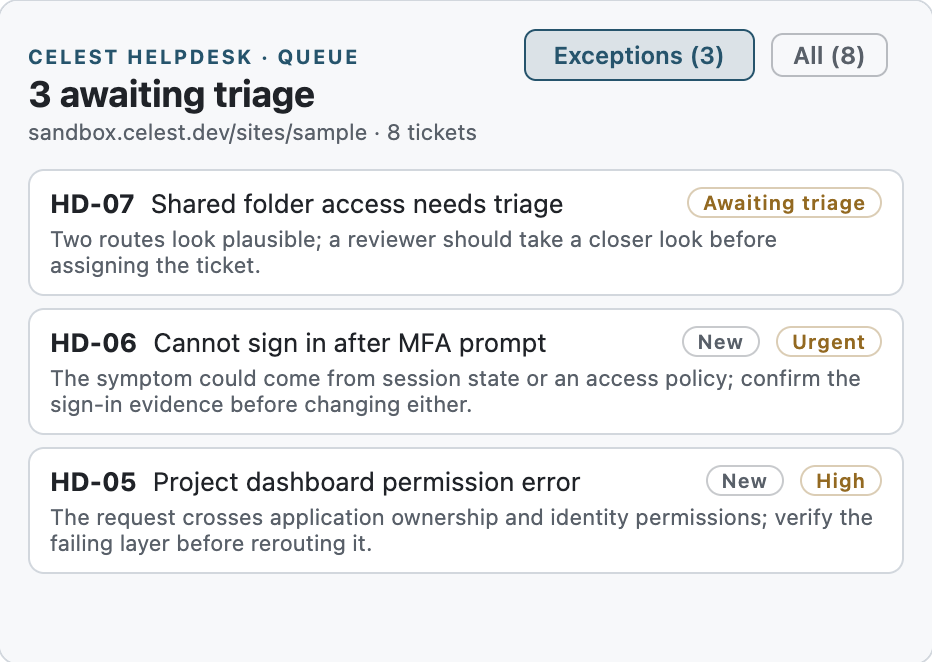
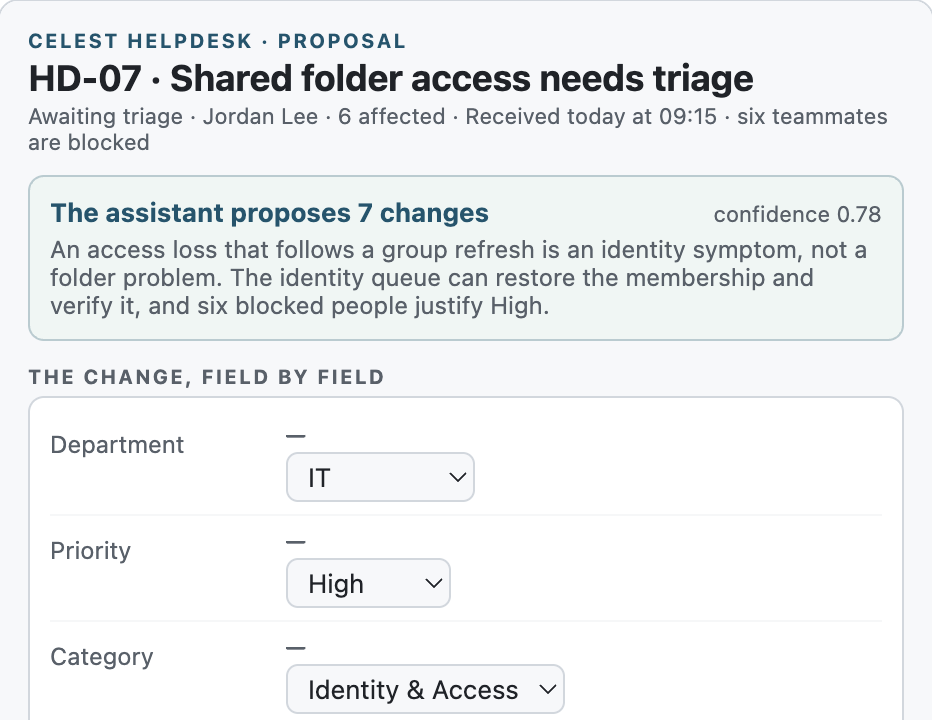
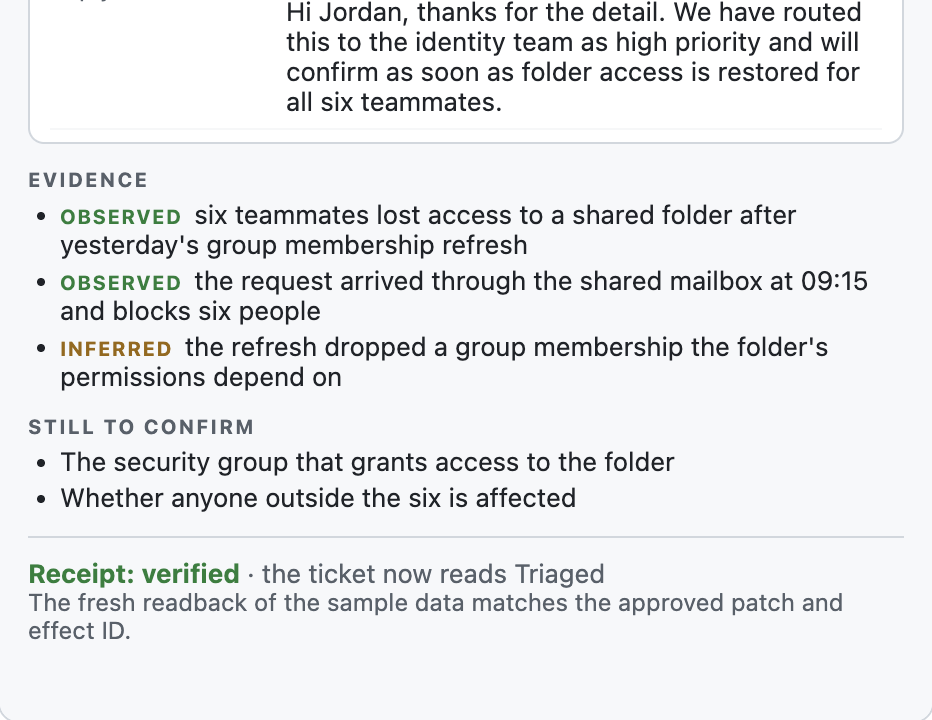
Jordan Lee's ticket lands in Service desk intake with Department and Priority empty. Casey asks Copilot for a proposal and gets one exact change beside its evidence: IT · High · Identity & Access, queued to IT Identity & Access, each line marked observed or inferred, the open question named. Casey hands the ticket to Sam Brooks, approves, and the ticket reads Triaged with a receipt that matches. The reply to Jordan stays a draft until a human sends it.
Demo workspace · example data.
What changes
For service desk leads and the operators who own a SharePoint queue and spend their judgment on the access, membership and ownership tickets that stall.
You stop reconstructing the ticket. The proposal arrives with its evidence marked observed or inferred and its gaps named. Change the fields you disagree with, approve once, and the card tells you when the ticket reads Triaged.
Every routing decision is a row: the proposal as shown, who approved, what changed, and whether the readback matched. A ticket someone else edited meanwhile is refused, not overwritten. The vocabulary is yours: departments, priorities, categories, queues, owners.
One package in your app catalog. After an administrator accepts the product terms in the setup card, setup creates three lists in a site you choose; on separate clicks it adds sample tickets, installs the site agent and registers the list command, using only the operator's own SharePoint permissions. No service to host, no keys to keep, no ticket data leaving the tenant.
Three places to meet it
The same queue, proposal, and receipt, wherever your operators already are.
In Microsoft 365 Copilot, ask for the queue, ask for a proposal on HD-06, and approve in the card. Copilot never applies anything; the card does, on your click.
A web part puts the queue and the setup card on any SharePoint page, or on the site's home page, in the site's own theme; a proposal opens beside the queue only when a WebMCP agent drives the page.
On the tickets list, Helpdesk queue opens the queue and Triage ticket opens a proposal for the selected row, so a hand triage gets the same receipt.
Inside your tenant
Helpdesk Triage adds evidence, approval, and verification to the SharePoint lists your operators already use.
A tenant-wide SharePoint Framework package with a Copilot Component keeps tickets, proposals, approvals, decisions, and history in Lists you own.
Microsoft 365 Copilot, operated by Microsoft under your Microsoft agreements, proposes one exact change as tool arguments. The component runs inside your tenant as the signed-in operator, who remains the SharePoint authority. Celest runs no service and receives no ticket data. Read the security boundary.
Your operator approves one exact change. SharePoint applies it with the ticket's version check and reads it back; a ticket someone else changed meanwhile is refused, not overwritten.
What you configure once
Copilot proposes only from the vocabulary you set: the departments, priorities, categories, queues, and assignees your desk already uses. A value outside it is refused by name.
Preview build
Bring one SharePoint queue and a representative exception. A founder walks it through the product with you, using your roles, routing and queues.
Free during the preview. Limited preview — enrolling by conversation. Write to [email protected]; bring the context you have.