
Celest · Helpdesk Triage · Preview
Bring one exception.
Leave with a clearer next step.
You know the ticket: open for a week because IT thinks it belongs to HR and HR thinks it belongs to IT. Bring that one. A founder walks it through the product with you, from queue to proposal to approval to receipt, using your routing vocabulary, your roles, and your review practice. You leave knowing whether this fits your desk and what a scoped pilot would take.
Limited preview — enrolling by conversation. Write to [email protected] with the shape of your queue and one ticket that stalled.
Working proof
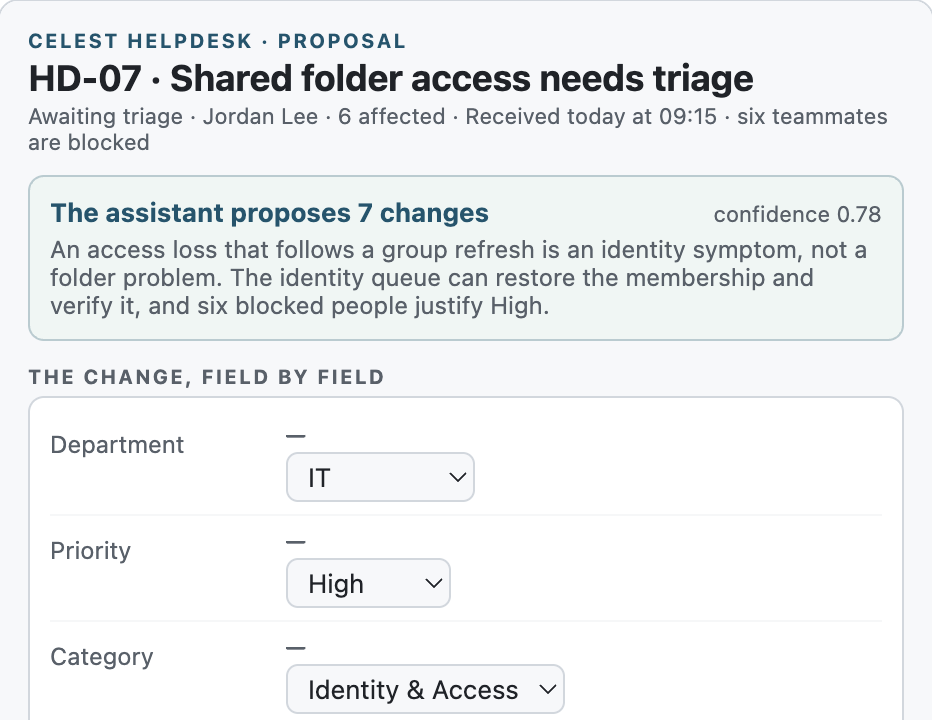
It has run for real: queue, proposal, approval, receipt.
The working proof lives in Celest's own tenant: a proposal fired through SharePoint's Copilot Workbench, an operator approved in the card, SharePoint applied one ETag-protected change, and the readback matched.
Send the useful context
Tell us about one queue.
Four lines is plenty. The email opens with prompts for your role, your queue, your volume, and the ticket you want to walk. Answer the ones you know.
- 1Your role
Who owns the queue, and who gives the approval that counts?
- 2Your queue
Which SharePoint site, list, or service desk intake should we understand?
- 3Your exception
Which ticket would make the conversation useful for your team?
- 4Your shape
Monthly volume, SPFx or tenant constraints, and timing.
What happens next
See it against your real queue.
The preview starts with one queue and one ticket. Together we make the current work visible and name the next useful step.
- 01Send the useful context
A few lines about your role, your queue, and one ticket give the conversation its starting shape.
- 02Map your queue
Your routing vocabulary, accountable owners, approval boundary, and handoff expectations.
- 03Walk one exception
Queue, proposal, approval, receipt, with you at the keyboard.
- 04Name the next useful step
Fit, open questions, and what a scoped pilot would require.